Prosper Centers
Benefits Assistance

Schedule an Appointment
Be sure to come prepared with the below documents to ensure a smooth application process. Your application can take longer for HHSC to process if you do not come prepared.
Please use the schedulers below, based on whether you live in or outside of Travis County, to set up an appointment.
For questions about the program, call 737-249-6394 or email benefitsassistance@foundcom.org
If you do not see an appointment available, please check back again at a later date; appointments typically become available on a weekly basis.
Travis County Appointments
Williamson County and Surrounding Area Appointments
If you live in or near Bastrop, Burnet, or Williamson County, please use this scheduling tool to set up an appointment at a Community Resource Center! If you have any questions, please call 512-381-4520.
What We Help With
- SNAP
- TANF
- WIC*
- Medicaid/CHIP
- Medicare Savings Programs**
- Long Term Care Services
- Healthy Texas Women
- Creating a YourTexasBenefits account
- Resetting your YourTexasBenefits account password
- Making your YourTexasBenefits account full access
- Uploading missing documents for your application
- Submitting change reports
- Check the status of your benefits***
**You must already be receiving Medicare to potentially qualify for a Medicare Savings Program, this is not a Medicare application.
***You must have previously met with us in person for us to be able to check the status of your benefits application. Your account may need to be full access before we can see this information.
We Do Not
- Apply for Social Security Benefits (SSI, RSDI)
- Apply for Medicare Benefits
- Apply for Marketplace Insurance – Prosper Health Coverage does!
- Make any decisions about your case, including approvals or denials
- Pick your health plan provider for you (if approved for Medicaid/CHIP)
- Decide how much financial assistance you are receiving (if approved for SNAP/TANF benefits)
- Conduct interviews related to your application
- Provide you with physical cards if you are approved for benefits (LoneStar Card, Medicaid Card, etc.)
- Complete Medical Access Program (MAP) Applications
Unsure if you qualify?
Check the links below for more information on eligibility:
Other Resources
Using the YTB Mobile App to Submit Documents
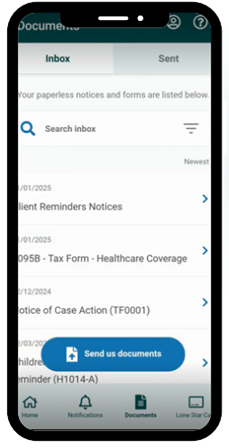
- 1. After signing in with your account, click the “Documents” tab in the app, where a pop-up can appear prompting you to send in documents.
- 2. On the next page, click Attach Documents and select the type of document you will be uploading from the dropdown menu (for example, “ID – Identification” or “Proof you can’t work.”) Hit next.
- 3. Pick how you want to include your document – oftentimes this may be “Take a photo.”
- 4. If the document is clear and legible in the document preview, select “use this photo”
- 5. Hit send, and you’re done!
Download the app here:
Play Store
Apple Store